
Camera for a Cruise: What to Bring If You’re Not a Photographer

Before my second cruise I spent three weeks reading camera reviews.
Not because I’m a photographer – I’m not. I work in a lab. I approach most equipment decisions the way I approach research: define the problem, identify the variables, find the option that solves it most efficiently.
The problem with cruise photography is specific. You need something that handles bright outdoor light, low indoor light, moving subjects, water, salt air, and occasional submersion – and you need to carry it all day without thinking about it.
After going through the options more carefully than most people need to, here’s what I found.
Quick Answer
For most people on a cruise to Mexico, a modern smartphone is genuinely enough – especially iPhone 14 Pro and above or Samsung S22 and above. If you want dedicated hardware, the GoPro HERO12 or DJI Osmo Pocket 3 cover the two main gaps smartphones leave: underwater photography and stable video. A travel compact like the Sony ZV-1 II is worth it if you care about photo quality in low light. Anything more complex than that is more camera than a non-photographer needs on a cruise.
The Actual Conditions You’re Shooting In
Before picking equipment, it helps to be specific about what you’re actually photographing.
Bright outdoor light – pool deck, port days, beaches. This is the easiest condition for any camera. Almost everything performs well here.
Low light interiors – the Main Dining Room, the theater, bars and lounges in the evening. This is where cheaper cameras and older phones struggle. Dark scenes with artificial light are harder than they look.
Motion – kids running on deck, water excursions, the ship pulling away from port. Anything that moves requires fast shutter speed or good image stabilization.
Water situations – pool splashes, water taxis, snorkeling. Most cameras and phones are not waterproof without protection. The ones that are cost more or require cases.
Port streets and architecture – Ensenada’s fish market, Puerto Vallarta’s colonial center, the arch at Cabo. Wide scenes in good light. Most cameras handle this well.
Understanding which of these matters most to you narrows the decision fast.
Option 1: Your Smartphone – Probably Already Enough
The honest answer for most people is that the phone already in their pocket takes excellent photos, and buying a dedicated camera adds weight, complexity, and cost without proportional improvement.
What modern smartphones do well on a cruise:
Daylight photos are excellent. The computational photography in current flagship phones – HDR processing, portrait mode, wide-angle lenses – produces results that would have required a professional camera five years ago.
Video is genuinely good. iPhone 15 Pro shoots 4K at 60fps with optical image stabilization. For vacation video, this is more than enough.
Convenience is unmatched. The camera is always with you, you don’t have to think about bringing it, and the photos go directly to your cloud without any transfer step.
Where smartphones fall short:
Optical zoom. Digital zoom degrades quality fast. If you want to photograph the arch at Cabo from the water taxi without losing detail, a phone zoom is limiting.
Low light. Current flagships handle this better than ever, but a dedicated camera with a larger sensor still has an edge in dark restaurant or evening deck shots.
Underwater. Modern iPhones have IP68 ratings – they survive splashes and brief submersion. But they’re not designed for extended underwater use or snorkeling depth. You need a case or a different device for that.
The threshold: if you have an iPhone 13 Pro or newer, or a Samsung S22 or newer – your phone is a serious camera. Buying dedicated hardware needs a specific reason.
Option 2: GoPro HERO12 – For Water and Action
The GoPro fills the specific gaps the phone leaves.
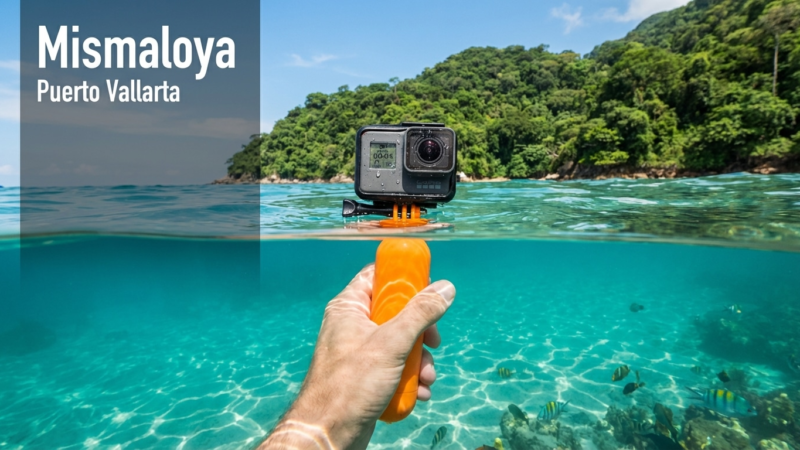
Waterproof to 33 feet without a case. This is the defining feature. Snorkeling in Ensenada or Cabo, kayaking, any water excursion where the camera is going in the water – the GoPro handles it without any additional protection.
Stabilization. GoPro’s HyperSmooth stabilization is genuinely impressive. Walking footage, boat footage, action sequences – the shakiness that would ruin phone video is smoothed out.
Durability. Drop it, get it wet, stuff it in a bag – the GoPro is built for this in a way most cameras aren’t.
The tradeoffs:
Photo quality in low light is mediocre compared to a phone or dedicated camera. The GoPro’s wide-angle lens is fixed – you get a specific look that works great for action and landscapes but isn’t ideal for portraits or close-up shots.
Battery life is limited – roughly 1.5-2 hours of active recording. On a full port day, you need a spare battery or a powerbank with USB-C. GoPro sells official spare batteries; third-party options on Amazon cost less and work fine.
The GoPro HERO12 Black is the current model as of early 2026. The HERO11 is nearly as capable and often significantly cheaper when the new model releases – worth checking price on both.
Accessories worth having: a chest mount or wrist strap for hands-free shooting, a floating grip (the GoPro sinks without one), and a small carrying case.
Option 3: DJI Osmo Pocket 3 – For Video Quality
Different tool, different use case.
The Osmo Pocket 3 is a gimbal-stabilized camera about the size of a large marker. It’s not waterproof. It’s not rugged. But the video quality it produces – smooth, cinematic, genuinely impressive – is better than what a GoPro or phone produces in most conditions.
Why it works well on a cruise:
The 3-axis gimbal means video footage looks like it was shot by someone who knows what they’re doing, even when you’re on a moving ship or a rocky water taxi.
The 1-inch sensor (larger than the Pocket 2) handles low light significantly better than a GoPro. Dinner table videos, sunset shots, indoor entertainment – the Osmo Pocket 3 produces usable footage where GoPro footage looks grainy.
The tradeoffs:
Not waterproof. At all. It needs a case near water and careful handling on port days.
More expensive than a GoPro. As of early 2026 the Osmo Pocket 3 runs $500-520. That’s a real investment for a camera you’re bringing on vacation.
Takes getting used to. The interface is a small touchscreen and takes a few hours to feel comfortable with.
Best for: people who specifically want to make a quality cruise video – a trip record, something to show family, content for any kind of blog or channel. The footage looks different from phone or GoPro footage in a way that matters if you care about it.
Option 4: Sony ZV-1 II – For Photo Quality
The compact camera category isn’t what it was ten years ago – phones have replaced most of it. But one specific gap remains: photo quality in challenging light with optical zoom.
The Sony ZV-1 II has a 24-50mm equivalent zoom lens, a 20.1MP sensor, and fast autofocus. In practical terms – the Ensenada fish market at midday looks better on this camera than on most phones. The dinner table at the MDR in warm restaurant light looks better. The arch at Cabo from 200 feet away looks sharper.
The tradeoff: it’s a camera you have to think about carrying. It’s not waterproof. It’s another thing in your bag. And the photo quality advantage over a current iPhone is real but not dramatic for casual vacation photos.
Best for: people who genuinely care about photo quality and want something better than a phone without getting into interchangeable lens territory.
Price as of early 2026: around $750-800. Worth it if photos matter to you. Hard to justify if they don’t.
The Drone Question
People ask about this occasionally. A drone at Cabo or Puerto Vallarta would produce incredible shots.
The practical reality: most Mexican cruise ports restrict or prohibit drone use without permits. Customs confiscates them regularly at the border. The logistics of bringing a drone on a cruise, registering it, and legally using it in Mexican ports are significant.
Unless you’re specifically researching this for a production project, leave the drone at home.
What to Actually Pack Based on Your Type
You just want good vacation photos and video, nothing special: use your phone. If it’s an iPhone 13 Pro or newer or Samsung S22 or newer – it’s enough. Add a waterproof pouch for beach days and water excursions.
You want to document a snorkeling or water excursion properly: add a GoPro HERO12 to your phone. Bring spare batteries. Get a floating grip.
You want to make a real cruise video you’ll actually watch again: DJI Osmo Pocket 3 with your phone as backup for water situations.
You care about photo quality above everything else: Sony ZV-1 II plus a waterproof phone pouch for the water situations the Sony can’t handle.
You want one device that does everything decently: GoPro HERO12. Not the best at anything, but capable across all conditions including water.
The Gear I Actually Travel With
My current setup: iPhone 15 Pro as the primary camera for most situations, GoPro HERO12 in my daypack for water excursions and action moments. That combination covers everything I’ve encountered on LA to Mexico cruises without adding serious weight or complexity.
The Osmo Pocket 3 is on my list for the next time I do a sailing specifically to document it. The footage quality is hard to ignore if video is the goal.
Everything else I’ve tested has been more camera than I needed for a vacation.
What are you shooting with on your cruises? Especially curious whether people have found a single device that covers all the bases – that’s the question I still haven’t fully solved. Leave it in the comments.
Disclaimer: Some links in this article are affiliate links (Amazon Associates). The price to you doesn’t change. I only recommend things I’ve personally used or researched in detail.


Comments are closed.